How Serena Works
Serena turns ideas, requests and priorities into structured work handled by specialist departments, reviewed through clear loops, and reported back through the Command Centre.
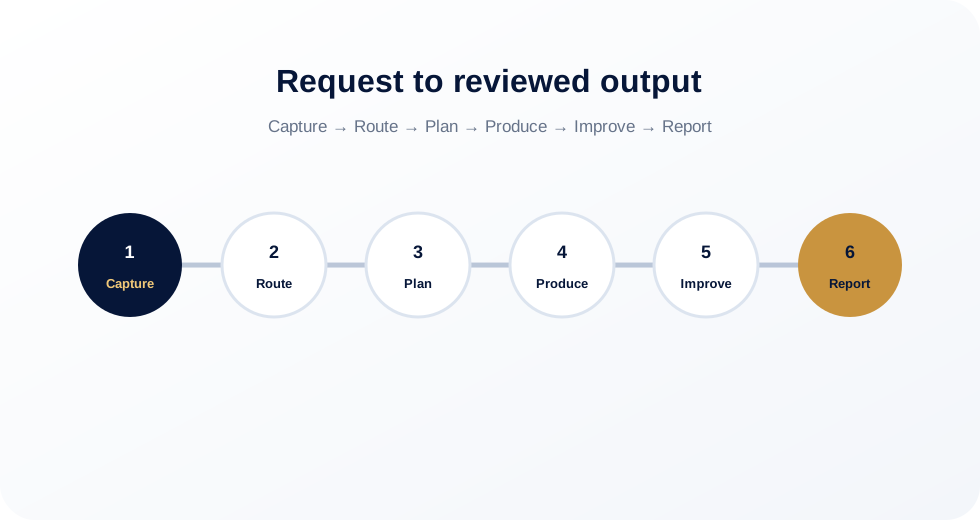
From request to reviewed output
Serena works best when each request moves through a clear path: capture, route, plan, produce, improve and report.
Capture the vision
Serena starts with goals, context, constraints and the desired outcome so the work begins with clarity.
Route to the right department
Website tasks go to Webster, visual assets go to Aurora, and other departments handle strategy, operations, research, compliance, health systems and future workflows.
Create the plan
Serena breaks work into briefs, tasks, assets, approvals, QA checks and practical next actions.
Produce the work
Departments generate copy, designs, assets, websites, documents, dashboards, reports or implementation packets.
Review and improve through loops
Visual QA, responsive QA, copy QA, accessibility QA, performance QA and final approval loops improve the work before it moves forward.
Report through the Command Centre
Progress, blockers, next actions and status are made visible through the command environment.
Webster builds. Aurora creates. Serena coordinates.
For websites, Webster owns strategy, page structure, WordPress-safe implementation, QA and rollback planning. Aurora provides the hero visuals, icons, infographics, motion concepts and creative QA that make the website feel premium and coherent.
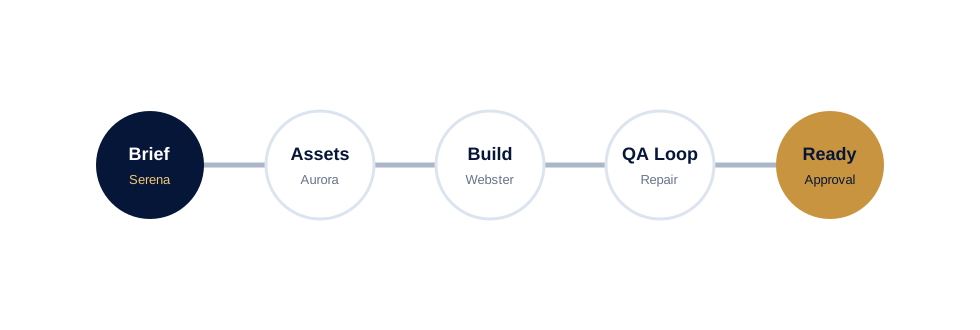
Approval, rollback and safe delivery
Live website changes, public assets and sensitive actions require approval and rollback planning. Serena should know what is proposed, what is changing, how it will be checked, and how it can be reversed before anything goes live.
Built for clarity
The Command Centre should always make the next action, blocker, review status and approval requirement visible.
Explore Serena Departments
See how the specialist departments work together through one command environment.
Explore Departments